Optimal undo_retention time
SELECT d.undo_size/(1024*1024) "ACTUAL UNDO SIZE [MByte]",
SUBSTR(e.value,1,25) "UNDO RETENTION [Sec]",
ROUND((d.undo_size / (to_number(f.value) *
g.undo_block_per_sec)))"OPTIMAL UNDO RETENTION [Sec]"
FROM (
SELECT SUM(a.bytes) undo_size
FROM v$datafile a,
v$tablespace b,
dba_tablespaces c
WHERE c.contents = 'UNDO'
AND c.status = 'ONLINE'
AND b.name = c.tablespace_name
AND a.ts# = b.ts#
) d,
v$parameter e,
v$parameter f,
(
SELECT MAX(undoblks/((end_time-begin_time)*3600*24))undo_block_per_sec
FROM v$undostat
) g
WHERE e.name = 'undo_retention'
AND f.name = 'db_block_size';
Optimal Undo Size
SELECT d.undo_size/(1024*1024) "ACTUAL UNDO SIZE [MByte]",
SUBSTR(e.value,1,25) "UNDO RETENTION [Sec]",
(TO_NUMBER(e.value) * TO_NUMBER(f.value) *
g.undo_block_per_sec) / (1024*1024)
"NEEDED UNDO SIZE [MByte]"
FROM (
SELECT SUM(a.bytes) undo_size
FROM v$datafile a,
v$tablespace b,
dba_tablespaces c
WHERE c.contents = 'UNDO'
AND c.status = 'ONLINE'
AND b.name = c.tablespace_name
AND a.ts# = b.ts#
) d,
v$parameter e,
v$parameter f,
(
SELECT MAX(undoblks/((end_time-begin_time)*3600*24))
undo_block_per_sec
FROM v$undostat
) g
WHERE e.name = 'undo_retention'
AND f.name = 'db_block_size';

Tuesday, June 4, 2013

Tuesday, April 30, 2013
Create Manual Snapshots and Generate AWR Report for Database
Create Manual Snapshot
Login to the database using SYS user.
Then, execute the following command to create a manual snapshot.
EXECUTE dbms_workload_repository.create_snapshot();
Then wait for 30 min ( or required time period ) and create another manual snapshot by following
command.
EXECUTE dbms_workload_repository.create_snapshot();
Then generate the AWR between those two manual snapshots.
Generating an AWR Report
The awrrpt.sql SQL script generates an HTML or text report that displays statistics for a range of snapshot Ids.
To generate an AWR report for a range of snapshots:
At the SQL prompt, enter:
@$ORACLE_HOME/rdbms/admin/awrrpt.sql
Specify whether you want an HTML or a text report:
Enter value for report_type: text
Specify the number of days for which you want to list snapshot Ids.
Enter value for num_days: 2
A list of existing snapshots for the specified time range is displayed. In this example, snapshots captured in the last 2 days are displayed.
Specify a beginning and ending snapshot ID for the workload repository report:
Enter value for begin_snap: 150
Enter value for end_snap: 160
In this example, the snapshot with a snapshot ID of 150 is selected as the beginning snapshot, and the snapshot with a snapshot ID of 160 is selected as the ending snapshot.
Enter a report name, or accept the default report name:
Enter value for report_name:
Using the report name awrrpt_1_150_160
In this example, the default name is accepted and an AWR report named awrrpt_1_150_160 is generated.
Wednesday, April 24, 2013
EBS R12 Cloning Issue Resolution on AIX / LINUX
Perl lib Version Conflict Resolution
While doing cloning 11gR2 database, the following error occurs in ApplyDBTier log:
Perl lib version (v5.8.5) doesn't match executable version (v5.10.0) at /usr/lib/perl5/5.8.5/i386-linux-thread-multi/Config.pm line 32.
It can fixed by setting PERL5LIB as follows.
export PERL5LIB=/finsys/db/tech_st/11.2.0/perl/lib/5.10.0:/finsys/db/tech_st/11.2.0/perl/lib/site_perl/5.10.0:/finsys/db/tech_st/11.2.0/appsutil/perl
Rapid Clone Error : 11gR2 Database : Perl lib Version (v5.8.5) Doesn't Match Executable Version (v5.10.0) [ID 1276455.1]
RC-00118 Error Resolution
RC-00118: Error occurred during creation of database
Raised by oracle.apps.ad.clone.ApplyDatabase
StackTrace:
java.lang.Exception: Control file creation failed
at oracle.apps.ad.clone.ApplyDatabase.doConf(ApplyDatabase.java:635)
at oracle.apps.ad.clone.ApplyDatabase.doApply(ApplyDatabase.java:473)
at oracle.apps.ad.clone.ApplyDatabase.(ApplyDatabase.java:366)
at oracle.apps.ad.clone.ApplyDBTier.(ApplyDBTier.java:110)
at sun.reflect.NativeConstructorAccessorImpl.newInstance0(Native Method)
at sun.reflect.NativeConstructorAccessorImpl.newInstance(Unknown Source)
at sun.reflect.DelegatingConstructorAccessorImpl.newInstance(Unknown Source)
at java.lang.reflect.Constructor.newInstance(Unknown Source)
at oracle.apps.ad.clone.util.CloneProcessor.run(CloneProcessor.java:67)
at java.lang.Thread.run(Unknown Source)
Change value of context variable s_db_listener in context file to the required target value (eg: TEST) and run autoconfig it will complete successful.

Cloning Error with ORA-01194 and RC-00118 can be resolved by following Oracle Note.
Rapid Clone Failed While Running "Adcfgclone.pl dbTier": ORA-01194 and RC-00118 [ID 375389.1]
Important oracle docs for block corruption issues.
Failure to Create new Control File Migrating From 32-Bit 10gr1 To 64-Bit 10gr2 [ID 458401.1]
Resolving ORA-600[3020] Raised During Recovery [ID 361172.1]
Ora-600 [Kcrrge.Cannotread_inc.1] Report During Block Media Recovery [ID 742468.1]
RC-50014: Fatal: Execution of AutoConfig was failed Raised by oracle.apps.ad.clone.ApplyDBTechStack
On Release 12 adcfgclone is failing with AC-00423, RC-50014 adcrdb.sh missing from file system (Doc ID 549872.1)
While doing cloning 11gR2 database, the following error occurs in ApplyDBTier log:
Perl lib version (v5.8.5) doesn't match executable version (v5.10.0) at /usr/lib/perl5/5.8.5/i386-linux-thread-multi/Config.pm line 32.
It can fixed by setting PERL5LIB as follows.
export PERL5LIB=/finsys/db/tech_st/11.2.0/perl/lib/5.10.0:/finsys/db/tech_st/11.2.0/perl/lib/site_perl/5.10.0:/finsys/db/tech_st/11.2.0/appsutil/perl
Rapid Clone Error : 11gR2 Database : Perl lib Version (v5.8.5) Doesn't Match Executable Version (v5.10.0) [ID 1276455.1]
RC-00118 Error Resolution
RC-00118: Error occurred during creation of database
Raised by oracle.apps.ad.clone.ApplyDatabase
StackTrace:
java.lang.Exception: Control file creation failed
at oracle.apps.ad.clone.ApplyDatabase.doConf(ApplyDatabase.java:635)
at oracle.apps.ad.clone.ApplyDatabase.doApply(ApplyDatabase.java:473)
at oracle.apps.ad.clone.ApplyDatabase.(ApplyDatabase.java:366)
at oracle.apps.ad.clone.ApplyDBTier.(ApplyDBTier.java:110)
at sun.reflect.NativeConstructorAccessorImpl.newInstance0(Native Method)
at sun.reflect.NativeConstructorAccessorImpl.newInstance(Unknown Source)
at sun.reflect.DelegatingConstructorAccessorImpl.newInstance(Unknown Source)
at java.lang.reflect.Constructor.newInstance(Unknown Source)
at oracle.apps.ad.clone.util.CloneProcessor.run(CloneProcessor.java:67)
at java.lang.Thread.run(Unknown Source)
Change value of context variable s_db_listener in context file to the required target value (eg: TEST) and run autoconfig it will complete successful.
Cloning Error with ORA-01194 and RC-00118 can be resolved by following Oracle Note.
Rapid Clone Failed While Running "Adcfgclone.pl dbTier": ORA-01194 and RC-00118 [ID 375389.1]
Important oracle docs for block corruption issues.
Failure to Create new Control File Migrating From 32-Bit 10gr1 To 64-Bit 10gr2 [ID 458401.1]
Resolving ORA-600[3020] Raised During Recovery [ID 361172.1]
Ora-600 [Kcrrge.Cannotread_inc.1] Report During Block Media Recovery [ID 742468.1]
RC-50014: Fatal: Execution of AutoConfig was failed Raised by oracle.apps.ad.clone.ApplyDBTechStack
On Release 12 adcfgclone is failing with AC-00423, RC-50014 adcrdb.sh missing from file system (Doc ID 549872.1)
Wednesday, April 17, 2013
Feature Availability by Oracle Database Edition
Feature Availability for Oracle Database Editions
| Feature/Option | SE1 | SE | EE | Notes |
|---|---|---|---|---|
|
High Availability |
||||
|
Oracle Fail Safe |
Y |
Y |
Y |
Windows only |
|
Oracle Data Guard—Redo Apply |
N |
N |
Y |
|
|
Oracle Data Guard—SQL Apply |
N |
N |
Y |
|
|
Oracle Data Guard—Snapshot Standby |
N |
N |
Y |
|
|
Oracle Active Data Guard |
N |
N |
Y |
Extra cost option |
|
Rolling Upgrades—Patch Set, Database, and Operating System |
N |
N |
Y |
|
|
Online index rebuild |
N |
N |
Y |
|
|
Online index-organized table organization |
N |
N |
Y |
ALTER TABLE ... MOVE ONLINE operations |
|
Online table redefinition |
N |
N |
Y |
Using the DBMS_REDEFINITION package |
|
Duplexed backup sets |
N |
N |
Y |
|
|
Block change tracking for fast incremental backup |
N |
N |
Y |
|
|
Unused block compression in backups |
N |
N |
Y |
|
|
Block-level media recovery |
N |
N |
Y |
|
|
Lost Write Protection |
N |
N |
Y |
|
|
Parallel backup and recovery |
N |
N |
Y |
|
|
Tablespace point-in-time recovery |
N |
N |
Y |
|
|
Trial recovery |
N |
N |
Y |
|
|
Fast-start fault recovery |
N |
N |
Y |
|
|
Flashback Table |
N |
N |
Y |
|
|
Flashback Database |
N |
N |
Y |
|
|
Flashback Transaction |
N |
N |
Y |
|
|
Flashback Transaction Query |
N |
N |
Y |
|
|
Flashback Data Archive (Total Recall) |
N |
N |
Y |
Requires Oracle Advanced Compression option |
|
Scalability |
||||
|
Oracle Real Application Clusters |
N |
Y |
Y |
Extra cost with EE, included with SE |
|
Automatic Workload Management |
N |
Y |
Y |
Requires Oracle Real Application Clusters |
|
Performance |
||||
|
Client Side Query Cache |
N |
N |
Y |
|
|
Query Results Cache |
N |
N |
Y |
|
|
PL/SQL Function Result Cache |
N |
N |
Y |
|
|
In-Memory Database Cache |
N |
N |
Y |
Extra cost option |
|
SQL Plan Management |
N |
N |
Y |
|
|
Support for Oracle Exadata Storage Server |
N |
N |
Y |
|
|
Support for Oracle Exadata Storage Server Software |
N |
N |
Y |
|
|
Security |
||||
|
Oracle Advanced Security |
N |
N |
Y |
Extra cost option |
|
Oracle Label Security |
N |
N |
Y |
Extra cost option |
|
Virtual Private Database |
N |
N |
Y |
|
|
Fine-grained auditing |
N |
N |
Y |
|
|
Oracle Database Vault |
N |
N |
Y |
Extra cost option |
|
Development Platform |
||||
|
SQLJ |
Y |
Y |
Y |
Requires Oracle Programmer |
|
Oracle Developer Tools for Visual Studio .NET |
Y |
Y |
Y |
Windows only |
|
Microsoft Distributed Transaction Coordinator support |
Y |
Y |
Y |
Windows only |
|
Active Directory integration |
Y |
Y |
Y |
Windows only |
|
Native .NET Data Provider—ODP.NET |
Y |
Y |
Y |
Windows only |
|
.NET Stored Procedures |
Y |
Y |
Y |
Windows only |
|
Manageability |
||||
|
Oracle Change Management Pack |
N |
N |
Y |
Extra cost option |
|
Oracle Configuration Management Pack |
N |
N |
Y |
Extra cost option |
|
Oracle Diagnostic Pack |
N |
N |
Y |
Extra cost option |
|
Oracle Tuning Pack |
N |
N |
Y |
Extra cost option, also requires the Diagnostic Pack |
|
Oracle Provisioning and Patch Automation Pack |
N |
N |
Y |
Extra cost option |
|
Database Resource Manager |
N |
N |
Y |
|
|
Oracle Real Application Testing |
N |
N |
Y |
Extra cost option |
|
VLDB, Data Warehousing, Business Intelligence |
||||
|
Oracle Partitioning |
N |
N |
Y |
Extra cost option |
|
Oracle OLAP |
N |
N |
Y |
Extra cost option |
|
Oracle Data Mining |
N |
N |
Y |
Extra cost option |
|
Oracle Advanced Compression |
N |
N |
Y |
Extra cost option |
|
Direct-Load Table Compression |
N |
N |
Y |
|
|
Bitmapped index, bitmapped join index, and bitmap plan conversions |
N |
N |
Y |
|
|
Parallel query/DML |
N |
N |
Y |
|
|
Parallel statistics gathering |
N |
N |
Y |
|
|
Parallel index build/scans |
N |
N |
Y |
|
|
Parallel Data Pump Export/Import |
N |
N |
Y |
|
|
Transportable tablespaces, including cross-platform |
N |
N |
Y |
Import of transportable tablespaces supported into SE, SE1, and EE |
|
Summary management—Materialized View Query Rewrite |
N |
N |
Y |
|
|
Asynchronous Change Data Capture |
N |
N |
Y |
|
|
Integration |
||||
|
Basic Replication |
Y |
Y |
Y |
SE1/SE: read-only, updateable materialized view |
|
Advanced Replication |
N |
N |
Y |
Multi-master replication |
|
Oracle Streams |
Y |
Y |
Y |
SE1/SE: no capture from redo |
|
Database Gateways |
Y |
Y |
Y |
Separate product license |
|
Networking |
||||
|
Oracle Connection Manager |
N |
N |
Y |
|
|
Infiniband Support |
N |
N |
Y |
|
|
Content Management |
||||
|
Oracle Spatial and Graph |
N |
N |
Y |
Extra cost option |
|
Semantic Technologies (RDF/OWL) |
N |
N |
Y |
Requires the Oracle Spatial and Graph option and the Oracle Partitioning option |
Monday, March 25, 2013




Tuesday, March 12, 2013
Running AutoConfig On DB Node Fails with: UnsatisfiedLinkError Exception Loading Native Library: njni11
Running AutoConfig On DB Node Reports: UnsatisfiedLinkError Exception Loading Native Library: njni11 after database cloning while running autoconfig below is the error.
Context Value Management will now update the Context file
UnsatisfiedLinkError exception loading native library: njni11
java.lang.UnsatisfiedLinkError: njni11 (No such file or directory)
Updating Context file...COMPLETED
Attempting upload of Context file and templates to database...COMPLETED
Updating rdbms version in Context file to db112
Updating rdbms type in Context file to 64 bits
Configuring templates from ORACLE_HOME ...
AutoConfig completed successfully.
This issue because of Database 11.2 it only comes with 64bit libraries, but we are still trying to use 32bit java as defined by context variables s_jdktop and s_jretop which points to ORACLE_HOME/appsutil/jre
Therefore changed the s_jdktop and s_jretop in $CONTEXT_FILE to point to $ORACLE_HOME/jdk/jre and executed the autoconfig and it was successful without any error.
Context Value Management will now update the Context file
Updating Context file...COMPLETED
Attempting upload of Context file and templates to database...COMPLETED
Updating rdbms version in Context file to db112
Updating rdbms type in Context file to 64 bits
Configuring templates from ORACLE_HOME ...
AutoConfig completed successfully.
Context Value Management will now update the Context file
UnsatisfiedLinkError exception loading native library: njni11
java.lang.UnsatisfiedLinkError: njni11 (No such file or directory)
Updating Context file...COMPLETED
Attempting upload of Context file and templates to database...COMPLETED
Updating rdbms version in Context file to db112
Updating rdbms type in Context file to 64 bits
Configuring templates from ORACLE_HOME ...
AutoConfig completed successfully.
This issue because of Database 11.2 it only comes with 64bit libraries, but we are still trying to use 32bit java as defined by context variables s_jdktop and s_jretop which points to ORACLE_HOME/appsutil/jre
Therefore changed the s_jdktop and s_jretop in $CONTEXT_FILE to point to $ORACLE_HOME/jdk/jre and executed the autoconfig and it was successful without any error.
Context Value Management will now update the Context file
Updating Context file...COMPLETED
Attempting upload of Context file and templates to database...COMPLETED
Updating rdbms version in Context file to db112
Updating rdbms type in Context file to 64 bits
Configuring templates from ORACLE_HOME ...
AutoConfig completed successfully.
Thursday, February 21, 2013
Shell Script to FTP Files
#!/bin/bash
HOST='192.168.1.200'
USER='test'
PASSWD='test'
DIR='/home/test'
FILES='*.dat'
ftp -n $HOST <<END_SCRIPT
user $USER $PASSWD
cd $DIR
ascii
prompt
mput $FILES
quit
exit 0
END_SCRIPT
HOST='192.168.1.200'
USER='test'
PASSWD='test'
DIR='/home/test'
FILES='*.dat'
ftp -n $HOST <<END_SCRIPT
user $USER $PASSWD
cd $DIR
ascii
prompt
mput $FILES
quit
exit 0
END_SCRIPT
Friday, January 4, 2013
Compile Forms and Libraries in Oracle EBS R12
Login as APPS owner and Set the environment on Application tier.
Compile Libraries
Go to directory top where libraries are residing.
eg : cd $AU_TOP/resource
Compile Libraies using following example command.
frmcmp.sh module=$AU_TOP/resource/RCVRCERH.pll userid=APPS/<apps_pw> output_file=$AU_TOP/resource/RCVRCERH.plx module_type=library batch=yes compile_all=special
Compile Forms
Go to form top where forms are residing.
eg : cd $AU_TOP/forms/US
Compile Forms using following example command.
frmcmp userid=apps/<apps_pw> module=RCVRCERC.fmb output_file=$AU_TOP/forms/US/RCVRCERC.fmx module_type=form batch=no compile_all=special
Compile Libraries
Go to directory top where libraries are residing.
eg : cd $AU_TOP/resource
Compile Libraies using following example command.
frmcmp.sh module=$AU_TOP/resource/RCVRCERH.pll userid=APPS/<apps_pw> output_file=$AU_TOP/resource/RCVRCERH.plx module_type=library batch=yes compile_all=special
Compile Forms
Go to form top where forms are residing.
eg : cd $AU_TOP/forms/US
Compile Forms using following example command.
frmcmp userid=apps/<apps_pw> module=RCVRCERC.fmb output_file=$AU_TOP/forms/US/RCVRCERC.fmx module_type=form batch=no compile_all=special
Tuesday, October 2, 2012
Email Generation Shell Scripts for DB Monitoring
Tablespace Monitor
#!/bin/sh
. /d01/oracle/VIS/db/tech_st/11.1.0/VIS_oracle.env
cat /home/oracle/VISION/tablespace.log
sqlplus '/ as sysdba' << EOF
set feedback off echo off
set linesize 100
set pagesize 200
set colsep |
SET TRIMSPOOL ON
spool /home/oracle/VISION/tablespace.log
SELECT df.tablespace_name TABLESPACE, df.total_space_mb TOTAL_SPACE_MB,
(df.total_space_mb - fs.free_space_mb) USED_SPACE_MB, fs.free_space_mb FREE_SPACE_MB,
ROUND(100 * (fs.free_space / df.total_space),2) PCT_FREE
FROM (SELECT tablespace_name, SUM (bytes) TOTAL_SPACE,
ROUND( SUM (bytes) / 1048576) TOTAL_SPACE_MB
FROM dba_data_files GROUP BY tablespace_name) df,
(SELECT tablespace_name, SUM (bytes) FREE_SPACE, ROUND( SUM (bytes) / 1048576) FREE_SPACE_MB
FROM dba_free_space GROUP BY tablespace_name) fs
WHERE df.tablespace_name = fs.tablespace_name(+) ORDER BY ROUND(100 * (fs.free_space / df.total_space),2);
spool off
exit
EOF
if [ `cat /home/oracle/VISION/tablespace.log|wc -l` -gt 0 ]
then
cat /home/oracle/VISION/tablespace.log >> /home/oracle/VISION/mailcontent
cat /home/oracle/VISION/tablespace.log |mailx -s "Tablespace Monitor" amila@aitkenspence.lk
rm -rf /home/oracle/VISION/tablespace.log
rm -rf /home/oracle/VISION/mailcontent
fi
Temporary Tablespace Monitor
#!/bin/sh
. /d01/oracle/VIS/db/tech_st/11.1.0/VIS_oracle.env
cat /home/oracle/VISION/tablespace.log
sqlplus '/ as sysdba' << EOF
set feedback off echo off
set linesize 100
set pagesize 200
set colsep |
SET TRIMSPOOL ON
spool /home/oracle/VISION/tablespace.log
SELECT A.tablespace_name tablespace, D.mb_total,
SUM (A.used_blocks * D.block_size) / 1024 / 1024 mb_used,
D.mb_total - SUM (A.used_blocks * D.block_size) / 1024 / 1024 mb_free
FROM v\$sort_segment A,
(
SELECT B.name, C.block_size, SUM (C.bytes) / 1024 / 1024 mb_total
FROM v\$tablespace B, v\$tempfile C
WHERE B.ts#= C.ts#
GROUP BY B.name, C.block_size
) D
WHERE A.tablespace_name = D.name
GROUP by A.tablespace_name, D.mb_total;
spool off
exit
EOF
if [ `cat /home/oracle/VISION/tablespace.log|wc -l` -gt 0 ]
then
cat /home/oracle/VISION/tablespace.log >> /home/oracle/VISION/mailcontent
cat /home/oracle/VISION/tablespace.log |mailx -s "Temporary Tablespace Monitor" amila@aitkenspence.lk
rm -rf /home/oracle/VISION/tablespace.log
rm -rf /home/oracle/VISION/mailcontent
fi
Invalid Objects Monitor
#!/bin/sh
. /d01/oracle/VIS/db/tech_st/11.1.0/VIS_oracle.env
cat /home/oracle/VISION/invalidobj.log
sqlplus '/ as sysdba' << EOF
set feedback off echo off
set linesize 100
set pagesize 200
set colsep |
column OBJECT_NAME format 999999
column OBJECT_NAME format a30
spool /home/oracle/VISION/invalidobj.log
SELECT OWNER, OBJECT_NAME , OBJECT_TYPE "ObjType"
FROM DBA_OBJECTS
WHERE STATUS = 'INVALID'
ORDER BY OWNER, OBJECT_TYPE, OBJECT_NAME;
spool off
exit
EOF
if [ `cat /home/oracle/VISION/invalidobj.log|wc -l` -gt 0 ]
then
cat /home/oracle/VISION/invalidobj.log >> /home/oracle/VISION/mailcontentobj
cat /home/oracle/VISION/invalidobj.log |mailx -s "Invalid Objects" amila@aitkenspence.lk
rm -rf /home/oracle/VISION/invalidobj.log
rm -rf /home/oracle/VISION/mailcontentobj
fi
#!/bin/sh
. /d01/oracle/VIS/db/tech_st/11.1.0/VIS_oracle.env
cat /home/oracle/VISION/tablespace.log
sqlplus '/ as sysdba' << EOF
set feedback off echo off
set linesize 100
set pagesize 200
set colsep |
SET TRIMSPOOL ON
spool /home/oracle/VISION/tablespace.log
SELECT df.tablespace_name TABLESPACE, df.total_space_mb TOTAL_SPACE_MB,
(df.total_space_mb - fs.free_space_mb) USED_SPACE_MB, fs.free_space_mb FREE_SPACE_MB,
ROUND(100 * (fs.free_space / df.total_space),2) PCT_FREE
FROM (SELECT tablespace_name, SUM (bytes) TOTAL_SPACE,
ROUND( SUM (bytes) / 1048576) TOTAL_SPACE_MB
FROM dba_data_files GROUP BY tablespace_name) df,
(SELECT tablespace_name, SUM (bytes) FREE_SPACE, ROUND( SUM (bytes) / 1048576) FREE_SPACE_MB
FROM dba_free_space GROUP BY tablespace_name) fs
WHERE df.tablespace_name = fs.tablespace_name(+) ORDER BY ROUND(100 * (fs.free_space / df.total_space),2);
spool off
exit
EOF
if [ `cat /home/oracle/VISION/tablespace.log|wc -l` -gt 0 ]
then
cat /home/oracle/VISION/tablespace.log >> /home/oracle/VISION/mailcontent
cat /home/oracle/VISION/tablespace.log |mailx -s "Tablespace Monitor" amila@aitkenspence.lk
rm -rf /home/oracle/VISION/tablespace.log
rm -rf /home/oracle/VISION/mailcontent
fi
Temporary Tablespace Monitor
#!/bin/sh
. /d01/oracle/VIS/db/tech_st/11.1.0/VIS_oracle.env
cat /home/oracle/VISION/tablespace.log
sqlplus '/ as sysdba' << EOF
set feedback off echo off
set linesize 100
set pagesize 200
set colsep |
SET TRIMSPOOL ON
spool /home/oracle/VISION/tablespace.log
SELECT A.tablespace_name tablespace, D.mb_total,
SUM (A.used_blocks * D.block_size) / 1024 / 1024 mb_used,
D.mb_total - SUM (A.used_blocks * D.block_size) / 1024 / 1024 mb_free
FROM v\$sort_segment A,
(
SELECT B.name, C.block_size, SUM (C.bytes) / 1024 / 1024 mb_total
FROM v\$tablespace B, v\$tempfile C
WHERE B.ts#= C.ts#
GROUP BY B.name, C.block_size
) D
WHERE A.tablespace_name = D.name
GROUP by A.tablespace_name, D.mb_total;
spool off
exit
EOF
if [ `cat /home/oracle/VISION/tablespace.log|wc -l` -gt 0 ]
then
cat /home/oracle/VISION/tablespace.log >> /home/oracle/VISION/mailcontent
cat /home/oracle/VISION/tablespace.log |mailx -s "Temporary Tablespace Monitor" amila@aitkenspence.lk
rm -rf /home/oracle/VISION/tablespace.log
rm -rf /home/oracle/VISION/mailcontent
fi
Invalid Objects Monitor
#!/bin/sh
. /d01/oracle/VIS/db/tech_st/11.1.0/VIS_oracle.env
cat /home/oracle/VISION/invalidobj.log
sqlplus '/ as sysdba' << EOF
set feedback off echo off
set linesize 100
set pagesize 200
set colsep |
column OBJECT_NAME format 999999
column OBJECT_NAME format a30
spool /home/oracle/VISION/invalidobj.log
SELECT OWNER, OBJECT_NAME , OBJECT_TYPE "ObjType"
FROM DBA_OBJECTS
WHERE STATUS = 'INVALID'
ORDER BY OWNER, OBJECT_TYPE, OBJECT_NAME;
spool off
exit
EOF
if [ `cat /home/oracle/VISION/invalidobj.log|wc -l` -gt 0 ]
then
cat /home/oracle/VISION/invalidobj.log >> /home/oracle/VISION/mailcontentobj
cat /home/oracle/VISION/invalidobj.log |mailx -s "Invalid Objects" amila@aitkenspence.lk
rm -rf /home/oracle/VISION/invalidobj.log
rm -rf /home/oracle/VISION/mailcontentobj
fi
Tuesday, August 7, 2012
Oracle EBS R12 Database Memory Parameters
Database Initialization Parameters for Oracle E-Business Suite Release 12 [ID 396009.1] SELECT ROUND(SUM(BYTES)/1024/1024,2) TOTAL_SGA,
ROUND(SUM(DECODE(NAME,'free memory',BYTES,0))/1024/1024,2) FREE,
ROUND((SUM(DECODE(NAME,'free memory',BYTES,0))/1024/1024)/(SUM(BYTES)/1024/1024)*100,2) FREE_PER
FROM V$SGASTAT
SELECT POOL, SUM(BYTES) FROM V$SGASTAT
WHERE POOL IS NOT NULL GROUP BY POOL
ORDER BY POOL;Memory Management Data Dictionary ViewsThe following dynamic performance views provide information on memory management:
| View | Description |
|---|---|
V$SGA |
Displays summary information about the system global area (SGA). |
V$SGAINFO |
Displays size information about the SGA, including the sizes of different SGA components, the granule size, and free memory. |
V$SGASTAT |
Displays detailed information about how memory is allocated within the shared pool, large pool, Java pool, and Streams pool. |
V$PGASTAT |
Displays PGA memory usage
statistics as well as statistics about the automatic PGA memory manager
when it is enabled (that is, when PGA_AGGREGATE_TARGET is set). Cumulative values in V$PGASTAT are accumulated since instance startup. |
V$MEMORY_DYNAMIC_COMPONENTS |
Displays information on the current size of all automatically tuned and static memory components, with the last operation (for example, grow or shrink) that occurred on each. |
V$SGA_DYNAMIC_COMPONENTS |
Displays the current sizes of all SGA components, and the last operation for each component. |
V$SGA_DYNAMIC_FREE_MEMORY |
Displays information about the amount of SGA memory available for future dynamic SGA resize operations. |
V$MEMORY_CURRENT_RESIZE_OPS |
Displays information about resize operations that are currently in progress. A resize operation is an enlargement or reduction of the SGA, the instance PGA, or a dynamic SGA component. |
V$SGA_CURRENT_RESIZE_OPS |
Displays information about dynamic SGA component resize operations that are currently in progress. |
V$MEMORY_RESIZE_OPS |
Displays information about
the last 800 completed memory component resize operations, including
automatic grow and shrink operations for SGA_TARGET and PGA_AGGREGATE_TARGET. |
V$SGA_RESIZE_OPS |
Displays information about the last 800 completed SGA component resize operations. |
V$MEMORY_TARGET_ADVICE |
Displays information that helps you tune MEMORY_TARGET if you enabled automatic memory management. |
V$SGA_TARGET_ADVICE |
Displays information that helps you tune SGA_TARGET. |
V$PGA_TARGET_ADVICE |
Displays information that helps you tune PGA_AGGREGATE_TARGET. |
Friday, July 13, 2012
Extract cpio files
Following command can be used to extract cpio files.
cpio -idmv < databasebackup.cpio
cpio -idmv < databasebackup.cpio
Thursday, July 12, 2012
Set Timezone in Redhat Linux
Edit the /etc/sysconfig/clock and set the time zone as following.
# The ZONE parameter is only evaluated by system-config-date.
# The timezone of the system is defined by the contents of /etc/localtime.
ZONE=Asia/Colombo
UTC=false
ARC=false
Then set the TZ variable as follows or set it in the .bash_profile.
export TZ=/usr/share/zoneinfo/Asia/Colombo
Now check the date/time using date command.
Also the command tzselect can be used to change the time zone.
# The ZONE parameter is only evaluated by system-config-date.
# The timezone of the system is defined by the contents of /etc/localtime.
ZONE=Asia/Colombo
UTC=false
ARC=false
Then set the TZ variable as follows or set it in the .bash_profile.
export TZ=/usr/share/zoneinfo/Asia/Colombo
Now check the date/time using date command.
Also the command tzselect can be used to change the time zone.
Tuesday, May 22, 2012
Oracle EBS R12 Log File Location
- Startup/Shutdown Log files: $INST_TOP/logs/appl/admin/log
- Patch log: $APPL_TOP/admin/$SID/log
- Autoconfig log file:
Apps: $INST_TOP/apps/$CONTEXT_NAME/admin/log/$MMDDHHMM/adconfig.log
DB: $ORACLE_HOME/appsutil/log/$CONTEXT_NAME/<MMDDHHMM>/adconfig.log
$ORACLE_HOME/appsutil/log/$CONTEXT_NAME/<MMDDHHMM>/NetServiceHandler.log
- Concurrent log: $INST_TOP/apps/$CONTEXT_NAME/logs/appl/conc/log
- Apache, OC4J and OPMN:
$LOG_HOME/ora/10.1.3/Apache
$LOG_HOME/ora/10.1.3/j2ee
$LOG_HOME/ora/10.1.3/opmn
- Alert Log File: $ORACLE_HOME/admin/$CONTEXT_NAME/bdump/alert_$SID.log
- Clone log:
Preclone log files in source instance
Apps: $INST_TOP/apps/$CONTEXT_NAME/admin/log/ (StageAppsTier_MMDDHHMM.log)
DB: $ORACLE_HOME/appsutil/log/$CONTEXT_NAME/(StageDBTier_MMDDHHMM.log)
Clone log files in target instance
Apps : $INST_TOP/apps/$CONTEXT_NAME/admin/log/ApplyAppsTier_<time>.log
DB: $ORACLE_HOME/appsutil/log/$CONTEXT_NAME/ApplyDBTier_<time>.log
For more information check for following metalink documents.
How to find location of Install, Autoconfig, Patching , Clone and other logs in R12 [ID 804603.1]
Oracle Application Server Diagnostic Tools and Log Files in Applications Release 12 [ID 454178.1]
- Patch log: $APPL_TOP/admin/$SID/log
- Autoconfig log file:
Apps: $INST_TOP/apps/$CONTEXT_NAME/admin/log/$MMDDHHMM/adconfig.log
DB: $ORACLE_HOME/appsutil/log/$CONTEXT_NAME/<MMDDHHMM>/adconfig.log
$ORACLE_HOME/appsutil/log/$CONTEXT_NAME/<MMDDHHMM>/NetServiceHandler.log
- Concurrent log: $INST_TOP/apps/$CONTEXT_NAME/logs/appl/conc/log
- Apache, OC4J and OPMN:
$LOG_HOME/ora/10.1.3/Apache
$LOG_HOME/ora/10.1.3/j2ee
$LOG_HOME/ora/10.1.3/opmn
- Alert Log File: $ORACLE_HOME/admin/$CONTEXT_NAME/bdump/alert_$SID.log
- Clone log:
Preclone log files in source instance
Apps: $INST_TOP/apps/$CONTEXT_NAME/admin/log/ (StageAppsTier_MMDDHHMM.log)
DB: $ORACLE_HOME/appsutil/log/$CONTEXT_NAME/(StageDBTier_MMDDHHMM.log)
Clone log files in target instance
Apps : $INST_TOP/apps/$CONTEXT_NAME/admin/log/ApplyAppsTier_<time>.log
DB: $ORACLE_HOME/appsutil/log/$CONTEXT_NAME/ApplyDBTier_<time>.log
For more information check for following metalink documents.
How to find location of Install, Autoconfig, Patching , Clone and other logs in R12 [ID 804603.1]
Oracle Application Server Diagnostic Tools and Log Files in Applications Release 12 [ID 454178.1]
Monday, April 23, 2012
DR Site Implementation
Oracle E-Business Suite Release 12 High Availability Documentation Roadmap [ID 1072636.1]
Business Continuity for Oracle E-Business Release 12 Using Oracle 11g Physical Standby Database [ID 1070033.1]
ORACLE RESTART - Physical Standby Database Is Started In Mode "Open, Readonly" After Server Reboot [ID 1436313.1]
Data Guard Real-Time Apply FAQ [ID 828274.1]
Creating a Physical Standby Database on Oracle 11.2.0.x [ID 1475344.1]
Redo Transport Compression in a Data Guard Environment [ID 729551.1]
How to Add Second Standby in Existing Dataguard Configuration With Broker Using DGMGRL (Doc ID 842822.1)
Business Continuity for Oracle E-Business Release 12 Using Oracle 11g Physical Standby Database [ID 1070033.1]
ORACLE RESTART - Physical Standby Database Is Started In Mode "Open, Readonly" After Server Reboot [ID 1436313.1]
Data Guard Real-Time Apply FAQ [ID 828274.1]
Creating a Physical Standby Database on Oracle 11.2.0.x [ID 1475344.1]
Redo Transport Compression in a Data Guard Environment [ID 729551.1]
How to Add Second Standby in Existing Dataguard Configuration With Broker Using DGMGRL (Doc ID 842822.1)
Wednesday, April 18, 2012
Tape Backup & Restore Commands
Display the content of the tape.
tar tvf /dev/st0
To backup data to tape with compression
tar cvzf /dev/st0 /u01/ebiz
To restore entire data from the tape
tar -xvf /dev/st0 -C /u01/amila
To restore specific file from the tape
tar -xvf /dev/st0 u01/ebiz/db/tech_st/11.1.0/VIS_oracle.env -C /u01/amila
More good references:
http://www.ravisaive.in/2011/09/linux-tape-backup-with-tar-mt.html
http://www.cyberciti.biz/faq/linux-tape-backup-with-mt-and-tar-command-howto/
tar tvf /dev/st0
To backup data to tape with compression
tar cvzf /dev/st0 /u01/ebiz
To restore entire data from the tape
tar -xvf /dev/st0 -C /u01/amila
To restore specific file from the tape
tar -xvf /dev/st0 u01/ebiz/db/tech_st/11.1.0/VIS_oracle.env -C /u01/amila
More good references:
http://www.ravisaive.in/2011/09/linux-tape-backup-with-tar-mt.html
http://www.cyberciti.biz/faq/linux-tape-backup-with-mt-and-tar-command-howto/
Wednesday, March 28, 2012
Oracle EBS R12 – Rapid Cloning
1. Copy the source system (PROD) to the target (TEST) system
First, the full file system backup (The TAR files) of the Oracle EBS production system should be copied to the test server. Then TAR files should be extracted to the location/mount point where required space available.
2. Recreate the Symbolic Links of the target (TEST) system
The symbolic links libclntsh.so.10.1 in [RDBMS ORACLE_HOME]/lib and [RDBMS ORACLE_HOME]/lib32 folders should be pointing to the file libclntsh.so in same folder. If the symbolic link libclntsh.so.10.1 NOT points to the correct path of the file libclntsh.so, the symbolic link libclntsh.so.10.1 should be deleted and recreated by using following commands.
[root@oracle lib]$ rm libclntsh.so.10.1
[root@oracle lib]$ ln -s [RDBMS ORACLE_HOME]/lib/libclntsh.so libclntsh.so.10.1
[root@oracle lib32]$ rm libclntsh.so.10.1
[root@oracle lib32]$ ln -s [RDBMS ORACLE_HOME]/lib32/libclntsh.so libclntsh.so.10.1
Note: If the symbolic links are pointing to the correct path please IGNORE this step.
3. Create a new OS User, Set User Ownership and Permissions for the entire file system
A new OS user should be created on the test server and the user should be added to the dba group.
[root@oracle /]$ useradd -g dba -d /home/oracle -m oracle
Then the entire file system should be given the permission and ownership should be set for the above user.
[root@oracle TEST]$ chmod –R 777 apps inst db
[root@oracle TEST]$ chown –R oracle:dba apps inst db
4. Configure(Clone) the target(TEST) system
After completing above steps, now the target file system is ready to configure (clone) as a new test system. First the TEST system database should be cloned and then the TEST system application should be cloned. These cloning commands should be executed through the new OS user created (ORACLE).
First move to the below path and execute the following command to start the Database Tier Cloning.
[oracle@oracle TEST]$ cd [RDBMS ORACLE_HOME]/appsutil/clone/bin
[oracle@oracle bin]$ perl adcfgclone.pl dbTier
*** Example [RDBMS ORACLE_HOME] would be /u01/finsys/db/tech_st/11.1.0.
Then move to the below path and execute the following command to start the Application Tier Cloning.
[oracle@oracle TEST]$ cd [COMMON_TOP]/clone/bin
[oracle@oracle bin]$ perl adcfgclone.pl appsTier
*** Example [COMMON_TOP] would be /u01/finsys/apps/apps_st/comn
First, the full file system backup (The TAR files) of the Oracle EBS production system should be copied to the test server. Then TAR files should be extracted to the location/mount point where required space available.
2. Recreate the Symbolic Links of the target (TEST) system
The symbolic links libclntsh.so.10.1 in [RDBMS ORACLE_HOME]/lib and [RDBMS ORACLE_HOME]/lib32 folders should be pointing to the file libclntsh.so in same folder. If the symbolic link libclntsh.so.10.1 NOT points to the correct path of the file libclntsh.so, the symbolic link libclntsh.so.10.1 should be deleted and recreated by using following commands.
[root@oracle lib]$ rm libclntsh.so.10.1
[root@oracle lib]$ ln -s [RDBMS ORACLE_HOME]/lib/libclntsh.so libclntsh.so.10.1
[root@oracle lib32]$ rm libclntsh.so.10.1
[root@oracle lib32]$ ln -s [RDBMS ORACLE_HOME]/lib32/libclntsh.so libclntsh.so.10.1
Note: If the symbolic links are pointing to the correct path please IGNORE this step.
3. Create a new OS User, Set User Ownership and Permissions for the entire file system
A new OS user should be created on the test server and the user should be added to the dba group.
[root@oracle /]$ useradd -g dba -d /home/oracle -m oracle
Then the entire file system should be given the permission and ownership should be set for the above user.
[root@oracle TEST]$ chmod –R 777 apps inst db
[root@oracle TEST]$ chown –R oracle:dba apps inst db
4. Configure(Clone) the target(TEST) system
After completing above steps, now the target file system is ready to configure (clone) as a new test system. First the TEST system database should be cloned and then the TEST system application should be cloned. These cloning commands should be executed through the new OS user created (ORACLE).
First move to the below path and execute the following command to start the Database Tier Cloning.
[oracle@oracle TEST]$ cd [RDBMS ORACLE_HOME]/appsutil/clone/bin
[oracle@oracle bin]$ perl adcfgclone.pl dbTier
*** Example [RDBMS ORACLE_HOME] would be /u01/finsys/db/tech_st/11.1.0.
Then move to the below path and execute the following command to start the Application Tier Cloning.
[oracle@oracle TEST]$ cd [COMMON_TOP]/clone/bin
[oracle@oracle bin]$ perl adcfgclone.pl appsTier
*** Example [COMMON_TOP] would be /u01/finsys/apps/apps_st/comn
Following metalink documents could be referenced to get more
information on Oracle EBS R12 cloning.
Cloning Oracle Applications Release 12 with Rapid Clone [ID 406982.1]
Using AutoConfig to Manage System Configurations in Oracle E-Business Suite Release 12 [ID 387859.1]
RC-20200: Fatal: Could not find Unzip. At this time only Native UnZip 5.X is supported (Doc ID 1410514.1)
Cloning Oracle Applications Release 12 with Rapid Clone [ID 406982.1]
Using AutoConfig to Manage System Configurations in Oracle E-Business Suite Release 12 [ID 387859.1]
RC-20200: Fatal: Could not find Unzip. At this time only Native UnZip 5.X is supported (Doc ID 1410514.1)
Thursday, March 15, 2012
Usage of FNDCPASS Utility
FNDCPASS <APPS username>/<APPS password> 0 Y <SYSTEM username>/<SYSTEM password> <token> <username> <new_password>
Following are the FNDCPASS Utility options that could be used with
different <token>.
1. Change the APPS and APPLSYS
schema password
The SYSTEM token is used when changing the APPLSYS password.
FNDCPASS <logon> 0 Y <system/password> SYSTEM
<username> <new_password>
FNDCPASS apps/apps 0 Y system/manager SYSTEM APPLSYS WELCOME
2. Change an Oracle Applications
schema password (other than APPS/APPLSYS)
The ORACLE token is used when changing a SINGLE Applications schema
password.
FNDCPASS <logon> 0 Y <system/password> ORACLE
<username> <new_password>
FNDCPASS apps/apps 0 Y system/manager ORACLE GL GL1
3. Change all ORACLE schema
passwords
The ALLORACLE token is used when changing ALL Applications schema
passwords.
FNDCPASS <logon> 0 Y <system/password> ALLORACLE
<new_password>
FNDCPASS apps/apps 0 Y system/manager ALLORACLE WELCOME
4. Change an Oracle Applications
user's password
The USER token is used when changing an Applications USER password.
FNDCPASS <logon> 0 Y <system/password> USER
<username> <new_password>
FNDCPASS apps/apps 0 Y system/manager USER VISION WELCOME
Important : Oracle Applications system should be shut down before changing any schema passwords. Also FND_USER and FND_ORACLE_USERID tables should be backed up before changing any passwords.
Important : Oracle Applications system should be shut down before changing any schema passwords. Also FND_USER and FND_ORACLE_USERID tables should be backed up before changing any passwords.
Refer My Oracle Support Document for more information.
ID 437260.1 - How to Change Applications Passwords using Applications Schema Password
Change Utility (FNDCPASS or AFPASSWD)
Monday, March 12, 2012
Profiles and Password Verify Function - Oracle 11g
Verify Function is a quick and easy way to enforce quality of database passwords—for example, they should contain a certain number of characters, should not be identical to the username, and so on.
In Oracle Database 11g, verify_fnction_11g function could be found on password verification file utlpwdmg.sql in $ORACLE_HOME/rdbms/admin.
At the end of the script following lines are available.
ALTER PROFILE DEFAULT LIMIT
PASSWORD_LIFE_TIME 180
PASSWORD_GRACE_TIME 7
PASSWORD_REUSE_TIME UNLIMITED
PASSWORD_REUSE_MAX UNLIMITED
FAILED_LOGIN_ATTEMPTS 10
PASSWORD_LOCK_TIME 1
PASSWORD_VERIFY_FUNCTION verify_function_11G;
By executing this script utlpwdmg.sql, it will attach the function to the profile DEFAULT, which is the default profile for all users.
Following query can be used to check the profile of the all users.
SELECT * FROM DBA_PROFILES WHERE PROFILE = 'DEFAULT'
Following query can be used to check the users who have the DEFAULT profile assigned.
SELECT USERNAME, PROFILE FROM DBA_USERS
-----------------------------------------------------------------------------------------------------------------
Tuesday, February 21, 2012
RMAN Setup
Setups in CATALOG database
Create a tablespace in catalog database and assign it to the user rman.
CREATE TABLESPACE CAT1 DATAFILE '/d04/oradata/catalog/rman.dbf' SIZE 100M AUTOEXTEND ON;
CREATE USER rman IDENTIFIED BY rman
DEFAULT TABLESPACE CAT1
TEMPORARY TABLESPACE TEMP QUOTA UNLIMITED ON CAT1;
grant connect,resource,recovery_catalog_owner to rman;
Type rman
RMAN> CONNECT CATALOG RMAN/RMAN
connected to recovery catalog database
RMAN> CREATE CATALOG;
recovery catalog created
Setups in TARGET database
create user backup_admin identified by backup_admin default tablespace users;
grant sysdba to backup_admin;
[oratest@oracle 11.1.0]$ rman target backup_admin/backup_admin@test catalog=rman/rman@catalog
Recovery Manager: Release 11.1.0.7.0 - Production on Tue Feb 21 23:39:22 2012
Copyright (c) 1982, 2007, Oracle. All rights reserved.
connected to target database: TEST (DBID=2072291809)
connected to recovery catalog database
RMAN> register database;
database registered in recovery catalog
starting full resync of recovery catalog
full resync complete
RMAN> show all;
RMAN configuration parameters for database with db_unique_name TEST are:
CONFIGURE RETENTION POLICY TO REDUNDANCY 1; # default
CONFIGURE BACKUP OPTIMIZATION OFF; # default
CONFIGURE DEFAULT DEVICE TYPE TO DISK; # default
CONFIGURE CONTROLFILE AUTOBACKUP OFF; # default
CONFIGURE CONTROLFILE AUTOBACKUP FORMAT FOR DEVICE TYPE DISK TO '%F'; # default
CONFIGURE DEVICE TYPE DISK PARALLELISM 1 BACKUP TYPE TO BACKUPSET; # default
CONFIGURE DATAFILE BACKUP COPIES FOR DEVICE TYPE DISK TO 1; # default
CONFIGURE ARCHIVELOG BACKUP COPIES FOR DEVICE TYPE DISK TO 1; # default
CONFIGURE MAXSETSIZE TO UNLIMITED; # default
CONFIGURE ENCRYPTION FOR DATABASE OFF; # default
CONFIGURE ENCRYPTION ALGORITHM 'AES128'; # default
CONFIGURE COMPRESSION ALGORITHM 'BZIP2'; # default
CONFIGURE ARCHIVELOG DELETION POLICY TO NONE; # default
CONFIGURE SNAPSHOT CONTROLFILE NAME TO '/d03/oracle/TEST/db/tech_st/11.1.0/dbs/snapcf_TEST.f'; # default
RMAN commands
RMAN> show controlfile autobackup format;
RMAN> show exclude;
RMAN> show all;
RMAN> configure backup optimization clear;
RMAN> configure maxsetsize clear;
RMAN> configure default device type clear;
Following configurations could be done to get a whole database backup.
RMAN> configure default device type to disk;
RMAN> configure default device type disk backup type to copy;
RMAN> configure controlfile autobackup on;
Oracle10g / 11g - Getting Started with Recovery Manager (RMAN) [ID 360416.1]
++ Merged Incremental Backup Strategies (Doc ID 745798.1)
++ Incrementally Updated Backup In 10G and higher (Doc ID 303861.1)
++ RMAN Fast Incremental Backups (Doc ID 262853.1)
++ Rman Fails to Find Level 0 Backup on Restore/Recovery of Incremental Backups (Doc ID 341861.1)
++ Encountered RMAN-03002 and RMAN-06091 when Deleting Obsolete Backups (Doc ID 567555.1)
Create a tablespace in catalog database and assign it to the user rman.
CREATE TABLESPACE CAT1 DATAFILE '/d04/oradata/catalog/rman.dbf' SIZE 100M AUTOEXTEND ON;
CREATE USER rman IDENTIFIED BY rman
DEFAULT TABLESPACE CAT1
TEMPORARY TABLESPACE TEMP QUOTA UNLIMITED ON CAT1;
grant connect,resource,recovery_catalog_owner to rman;
Type rman
RMAN> CONNECT CATALOG RMAN/RMAN
connected to recovery catalog database
RMAN> CREATE CATALOG;
recovery catalog created
Setups in TARGET database
create user backup_admin identified by backup_admin default tablespace users;
grant sysdba to backup_admin;
[oratest@oracle 11.1.0]$ rman target backup_admin/backup_admin@test catalog=rman/rman@catalog
Recovery Manager: Release 11.1.0.7.0 - Production on Tue Feb 21 23:39:22 2012
Copyright (c) 1982, 2007, Oracle. All rights reserved.
connected to target database: TEST (DBID=2072291809)
connected to recovery catalog database
RMAN> register database;
database registered in recovery catalog
starting full resync of recovery catalog
full resync complete
RMAN> show all;
RMAN configuration parameters for database with db_unique_name TEST are:
CONFIGURE RETENTION POLICY TO REDUNDANCY 1; # default
CONFIGURE BACKUP OPTIMIZATION OFF; # default
CONFIGURE DEFAULT DEVICE TYPE TO DISK; # default
CONFIGURE CONTROLFILE AUTOBACKUP OFF; # default
CONFIGURE CONTROLFILE AUTOBACKUP FORMAT FOR DEVICE TYPE DISK TO '%F'; # default
CONFIGURE DEVICE TYPE DISK PARALLELISM 1 BACKUP TYPE TO BACKUPSET; # default
CONFIGURE DATAFILE BACKUP COPIES FOR DEVICE TYPE DISK TO 1; # default
CONFIGURE ARCHIVELOG BACKUP COPIES FOR DEVICE TYPE DISK TO 1; # default
CONFIGURE MAXSETSIZE TO UNLIMITED; # default
CONFIGURE ENCRYPTION FOR DATABASE OFF; # default
CONFIGURE ENCRYPTION ALGORITHM 'AES128'; # default
CONFIGURE COMPRESSION ALGORITHM 'BZIP2'; # default
CONFIGURE ARCHIVELOG DELETION POLICY TO NONE; # default
CONFIGURE SNAPSHOT CONTROLFILE NAME TO '/d03/oracle/TEST/db/tech_st/11.1.0/dbs/snapcf_TEST.f'; # default
RMAN commands
RMAN> show controlfile autobackup format;
RMAN> show exclude;
RMAN> show all;
RMAN> configure backup optimization clear;
RMAN> configure maxsetsize clear;
RMAN> configure default device type clear;
Following configurations could be done to get a whole database backup.
RMAN> configure default device type to disk;
RMAN> configure default device type disk backup type to copy;
RMAN> configure controlfile autobackup on;
Oracle10g / 11g - Getting Started with Recovery Manager (RMAN) [ID 360416.1]
++ Merged Incremental Backup Strategies (Doc ID 745798.1)
++ Incrementally Updated Backup In 10G and higher (Doc ID 303861.1)
++ RMAN Fast Incremental Backups (Doc ID 262853.1)
++ Rman Fails to Find Level 0 Backup on Restore/Recovery of Incremental Backups (Doc ID 341861.1)
++ Encountered RMAN-03002 and RMAN-06091 when Deleting Obsolete Backups (Doc ID 567555.1)
ORA Error Codes
ORA-00059: maximum number of DB_FILES exceeded
Get the db_files parameter value from the following SQL or using pfile.
select value from v$parameter where name = ‘db_files’;
Get the count of the datafiles created
select count(*) from v$datafile;
When exceeding the db_files parameter ORA-00059 error given.
Increasing the value of the db_files parameter will resolve the problem.
ORA-01102: cannot mount database in EXCLUSIVE mode
Get the db_files parameter value from the following SQL or using pfile.
select value from v$parameter where name = ‘db_files’;
Get the count of the datafiles created
select count(*) from v$datafile;
When exceeding the db_files parameter ORA-00059 error given.
Increasing the value of the db_files parameter will resolve the problem.
ORA-01102: cannot mount database in EXCLUSIVE mode
Oracle Database Configuration
Set the .bash_profile
ORACLE_HOME=/d04/product/11.2.0/dbhome_1
export ORACLE_HOME
ORACLE_SID=DEV
export ORACLE_SID
PATH=$PATH:$ORACLE_HOME/bin
export PATH
Create pfile from spfile
CREATE PFILE = '/d04/product/11.2.0/dbhome_1/dbs/initDEV.ora'
FROM SPFILE = '/d04/product/11.2.0/dbhome_1/dbs/spfiledev.ora';
Enable archivelog mode
ORACLE_HOME=/d04/product/11.2.0/dbhome_1
export ORACLE_HOME
ORACLE_SID=DEV
export ORACLE_SID
PATH=$PATH:$ORACLE_HOME/bin
export PATH
Create pfile from spfile
CREATE PFILE = '/d04/product/11.2.0/dbhome_1/dbs/initDEV.ora'
FROM SPFILE = '/d04/product/11.2.0/dbhome_1/dbs/spfiledev.ora';
Enable archivelog mode
Thursday, February 16, 2012
How to change the Oracle EBS R12 listener port
Refer following metalink document.
How to change the Web Listener Port number in Oracle E-Business Suite Release 12? [ID 760590.1]
How to change the Web Listener Port number in Oracle E-Business Suite Release 12? [ID 760590.1]
Tuesday, February 14, 2012
Oracle EBS Upgrade - 12.1.1 to 12.1.3
Oracle EBS upgrade from R12.1.1 to R12.1.3
Refer the following my Oracle Support document.
Oracle E-Business Suite Release 12.1.3 Readme [ID 1080973.1]
To apply Oracle E-Business Suite Release 12.1.3, follow these steps:
Refer the following my Oracle Support document.
Oracle E-Business Suite Release 12.1.3 Readme [ID 1080973.1]
To apply Oracle E-Business Suite Release 12.1.3, follow these steps:
- Use AutoPatch to apply R12.AD.B.DELTA.3 Patch 9239089.Note: Do not merge this patch with any other patch. R12.AD.B.Delta.3 must be applied separately.
- Use AutoPatch to apply Oracle E-Business Suite Release 12.1.3 Patch 9239090 and follow the instructions in the patch readme file.
- Use AutoPatch to apply the latest consolidated online help Patch 9239095 and follow the instructions in the patch readme file.
- Apply mandatory Patch 9817770 (9817770:R12.ATG_PF.B [POST-R12.ATG_PF.B.DELTA.3 CONSOLIDATED PATCH].)
- Apply mandatory Patch 9966055 (9966055:R12.FND.B [TRANSLATED VERSION OF FNDSCSGN NOT LAUNCHED].)
Friday, February 3, 2012
Configure DBConsole for Oracle EBS R12 Database
Configure the DBConsole Repository
Following command can be executed to configure DBConsole along with the repository.
Change the directory to database ORACLE_HOME and execute the environment file.
[oratest@oracle 11.1.0]$ . TEST_oracle.env
Then move to [ORACLE_HOME]/bin and execute the following command.
[oratest@oracle bin]$ emca -config dbcontrol db -repos create


Start/Stop & Check DBconsole Status
Then using the emctl command DBconsole could be started, stopped and also status could be checked.
[oratest@oracle bin]$ emctl start dbconsole
[oratest@oracle bin]$ emctl stop dbconsole
[oratest@oracle bin]$ emctl status dbconsole
Oracle Enterprise Manager 11g Database Control Release 11.1.0.7.0
Copyright (c) 1996, 2008 Oracle Corporation. All rights reserved.
https://oracle.calspence.lk:1158/em/console/aboutApplication
Oracle Enterprise Manager 11g is running.
------------------------------------------------------------------
Logs are generated in directory /d03/oracle/TEST/db/tech_st/11.1.0/oracle.calspence.lk_TEST/sysman/log
Now can login through the sys user.

Refer following metalink document for more information.
Master Note for Enterprise Manager Configuration Assistant (EMCA) in Single Instance Database Environment [ID 1099271.1]
Following command can be executed to configure DBConsole along with the repository.
Change the directory to database ORACLE_HOME and execute the environment file.
[oratest@oracle 11.1.0]$ . TEST_oracle.env
Then move to [ORACLE_HOME]/bin and execute the following command.
[oratest@oracle bin]$ emca -config dbcontrol db -repos create


Start/Stop & Check DBconsole Status
Then using the emctl command DBconsole could be started, stopped and also status could be checked.
[oratest@oracle bin]$ emctl start dbconsole
[oratest@oracle bin]$ emctl stop dbconsole
[oratest@oracle bin]$ emctl status dbconsole
Oracle Enterprise Manager 11g Database Control Release 11.1.0.7.0
Copyright (c) 1996, 2008 Oracle Corporation. All rights reserved.
https://oracle.calspence.lk:1158/em/console/aboutApplication
Oracle Enterprise Manager 11g is running.
------------------------------------------------------------------
Logs are generated in directory /d03/oracle/TEST/db/tech_st/11.1.0/oracle.calspence.lk_TEST/sysman/log
Now can login through the sys user.

Refer following metalink document for more information.
Master Note for Enterprise Manager Configuration Assistant (EMCA) in Single Instance Database Environment [ID 1099271.1]
Thursday, February 2, 2012
Oracle EBS R12 Installation
Requirements & Steps
File system space required for Standard Installation as follows.


File system space required for Standard Installation as follows.
- Applications node file system (includes OracleAS 10.1.2 Oracle Home, OracleAS 10.1.3 Oracle Home, COMMON_TOP, APPL_TOP, and INST_TOP) 35 GB
- Database node file system (Fresh install) 55 GB
- Database node file system (Vision Demo database) 208 GB
- Linux x86 - [ Note ID: 761564.1 ]
- Linux x86-64 (64-bit) - [ Note ID - 761566.1]
- First copy all installation disks in to the server.
- create a directory for installation (d03).
- Also set the /etc/oraInst.loc as inventory_loc=/d03/oraInventory. If there is no oraInst.loc file, create a new file.
- Installation can be done through single user or multiple users.
- For single user installation, ORACLE user can be used for both DB & Apps tier file systems.
- For multiple user installation, ORACLE user can be used for DB tier file system and APPLMGR can be used for Apps tier file system.
- Then go to the /StageR12/startCD/Disk1/rapidwiz directory and execute ./rapidwiz
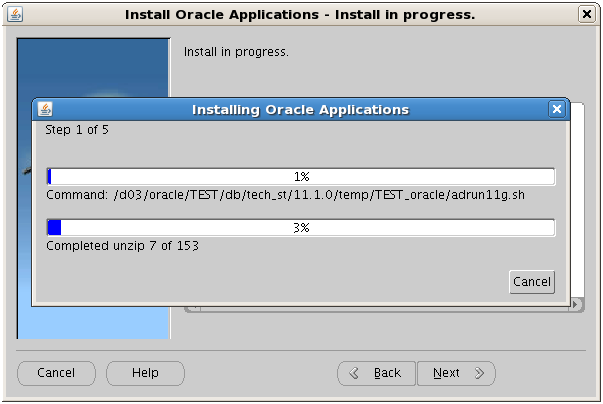
- Then following screens will appear and after entering necessary parameters, can proceed with the installation.
- In the process of the installation, you can either install a Vision Demo Instance or a Fresh Instance by selecting the database type.




Subscribe to:
Posts (Atom)